

LBank P2P allows you to sell crypto directly to other users and receive local fiat currency. You can choose suitable buyers based on your preferred price, payment method, and trading terms, while benefiting from LBank’s escrow protection for a safer and more convenient trading experience.
During the transaction, you can filter ads based on your needs, enter the amount or quantity you want to sell, confirm your payment method and order details, and release the crypto only after verifying that payment has been received.
Access P2P Trading
-
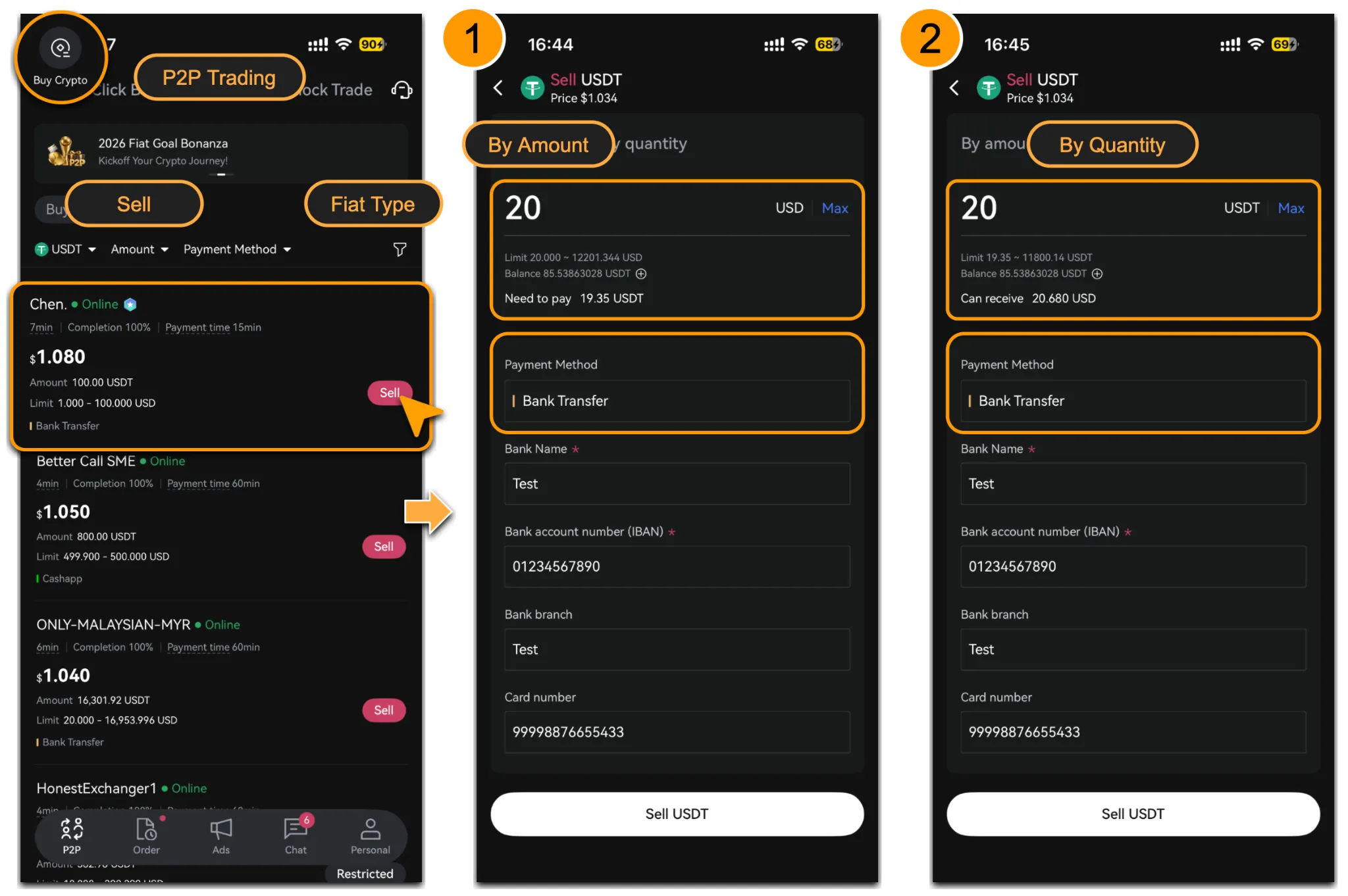
Log in to the LBank App and tap「 Buy Crypto」.
-
Once entered, tab「Sell」and select the corresponding fiat currency to view available buyer ads.
-
You can filter ads by:
-
The cryptocurrency you want to sell, such as USDT or other supported tokens.
-
Set「Amount」and「Payment Method」.
-
After applying the filters, choose a suitable buyer ad and tap「Sell」to enter the trading page. You can choose to sell「By Amount」or「By Quantity」.
Confirm Order Details & Place the Order
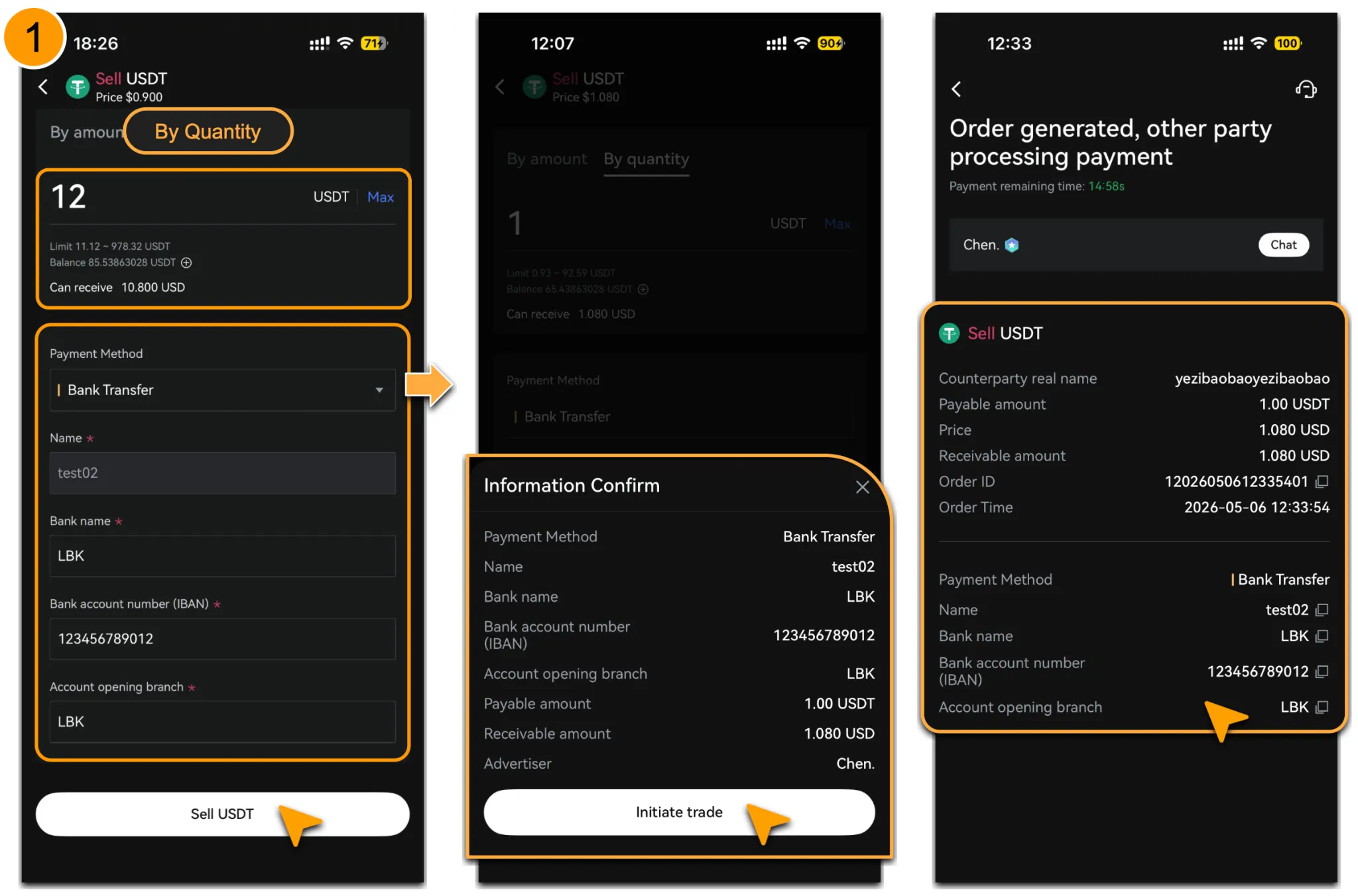
Using「Sell」>「By Quantity」as an example:
-
Enter the amount of crypto you want to sell. The system will display the estimated amount of fiat you will receive.
-
After confirming that the merchant information under the payment method is correct, tap「Sell」to proceed to the confirmation page.
-
Review the bank details, the amount of crypto to be sold, the fiat amount to be received, and the advertiser details on the「Information Confirmation」page.
-
If all information is correct, tap「Initial Trade」.
-
Once the order is created, the corresponding crypto will be placed in platform escrow while waiting for the buyer to make payment.
Wait for Buyer Payment & Confirm Receipt
-
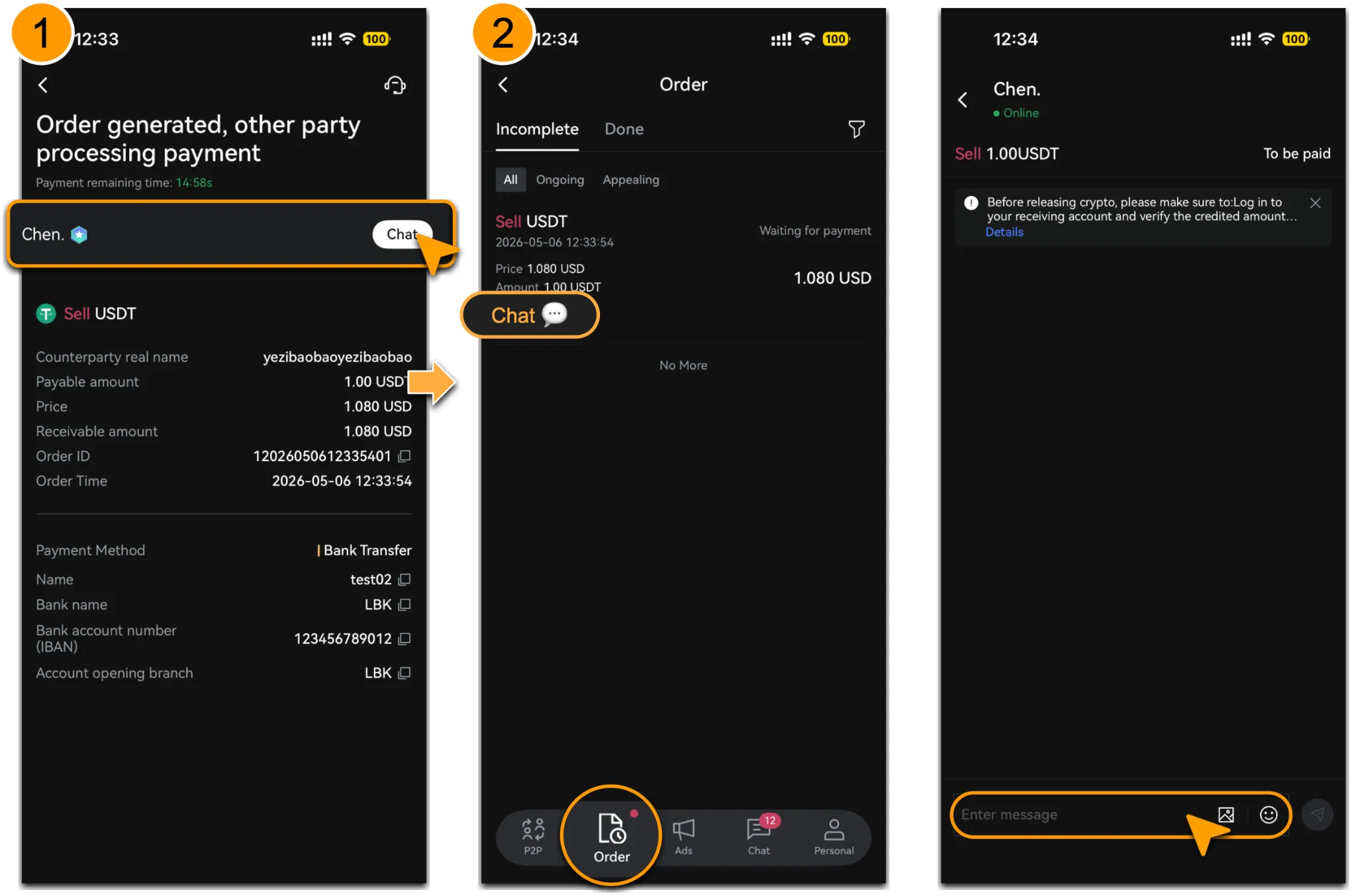
After the order is created, you can go to「Orders」to check the transaction status, order number, order time, amount to be paid, amount to be received, and transaction remarks.
-
If you need to communicate with the buyer, tap「Chat💬」 to contact them and check whether they have completed the payment according to the order requirements.
-
Before releasing crypto, make sure to log in to your receiving account and verify that the actual amount received matches the order amount exactly.
-
Payments must be made and received through accounts registered under your own real name. Do not accept third-party payments to avoid asset risks and transaction disputes.
-
Only release the crypto after confirming that the payment has been successfully credited and is correct.
How to Cancel an Order
-
If the buyer has not yet confirmed payment, please contact them through「Chat 💬」 and communicate to cancel the order.
-
If the buyer has already updated the status to「Payment Confirmed」, but you have not received the corresponding funds in your receiving account, or if the transaction needs to be terminated for any other reason, do not tap Confirm Receipt, otherwise this may result in unnecessary asset loss.
-
Please wait until 3 minutes after the buyer confirms payment, then tap「Appeal」and submit the reason for cancellation together with relevant screenshots and supporting evidence for customer service review and handling.
-
To avoid disputes, please communicate only within the platform and keep complete records. Do not conduct any off-platform transactions with the counterparty.
Important Note
-
Before releasing crypto, always confirm that the actual amount received in your receiving account matches the order amount exactly.
-
Do not accept third-party payments, and make sure both the payment and receiving accounts are real-name accounts registered under your own name.
-
If there is any issue during the transaction, if the buyer does not pay as required, or if you have any concerns about the payment received, please keep the chat and order records and promptly file an appeal or contact customer service. Do not conduct off-platform transactions, as this helps protect your assets.
-
It is recommended that you add and verify your payment method in advance. For details, please refer to 「LBank P2P: How to Manage Payment Methods」。
View Assets
-
After the sale is successfully completed, you can check the transaction status in the order details. The corresponding crypto will be deducted from escrow based on the order status, and you should receive the corresponding fiat funds in your receiving account.
-
If the buyer has marked the order as paid but you have not actually received the funds, or if any abnormality occurs during the transaction, please contact LBank customer service immediately for assistance.
Reminder
To protect your assets, always log in to your own receiving account before releasing crypto and carefully verify that the actual credited amount matches the order amount exactly. Do not accept any third-party payments.
If the buyer has marked the order as paid but you have not received the corresponding funds, or if any abnormal situation occurs during the transaction, do not release the crypto directly. Please file an appeal within the required timeframe and submit relevant screenshots and supporting materials for platform customer service to review and handle.
Please complete all communication and transactions within the LBank platform and keep chat records, payment vouchers, and receipt screenshots properly to avoid unnecessary transaction disputes.