Managing deposit and withdrawal addresses is essential for securing cryptocurrency transactions. LBank offers easy address management, along with a withdrawal whitelist and security features. This guide explains how to add, manage addresses, and enable security settings.
Deposit Addresses
View Deposit Address
-
Log in to LBank App and tap「Assets」;
-
Tap「Deposit」>「Deposit cryptocurrency」;

-
Choose「Token」and「Network」;
-
Tap「Deposit address」.

Add Deposit Address
-
Tap「Add Address」to add a new address;
-
Swipe left「Address」to「Edit」;
-
Add an「Address Name」and tap「Confirm」.

📌Note: Each network supports up to 20 deposit addresses.
Withdrawal Addresses
Add Withdrawal Address
-
Log in to LBank App and tap「Assets」;
-
Tap「Withdrawal」;
-
Tap the「Token」 to be withdrawn and choose「On-chain」or「Internal」.

On-chain
-
Choose「On-chain」;
-
Tap「Address book」>「Add Address」;
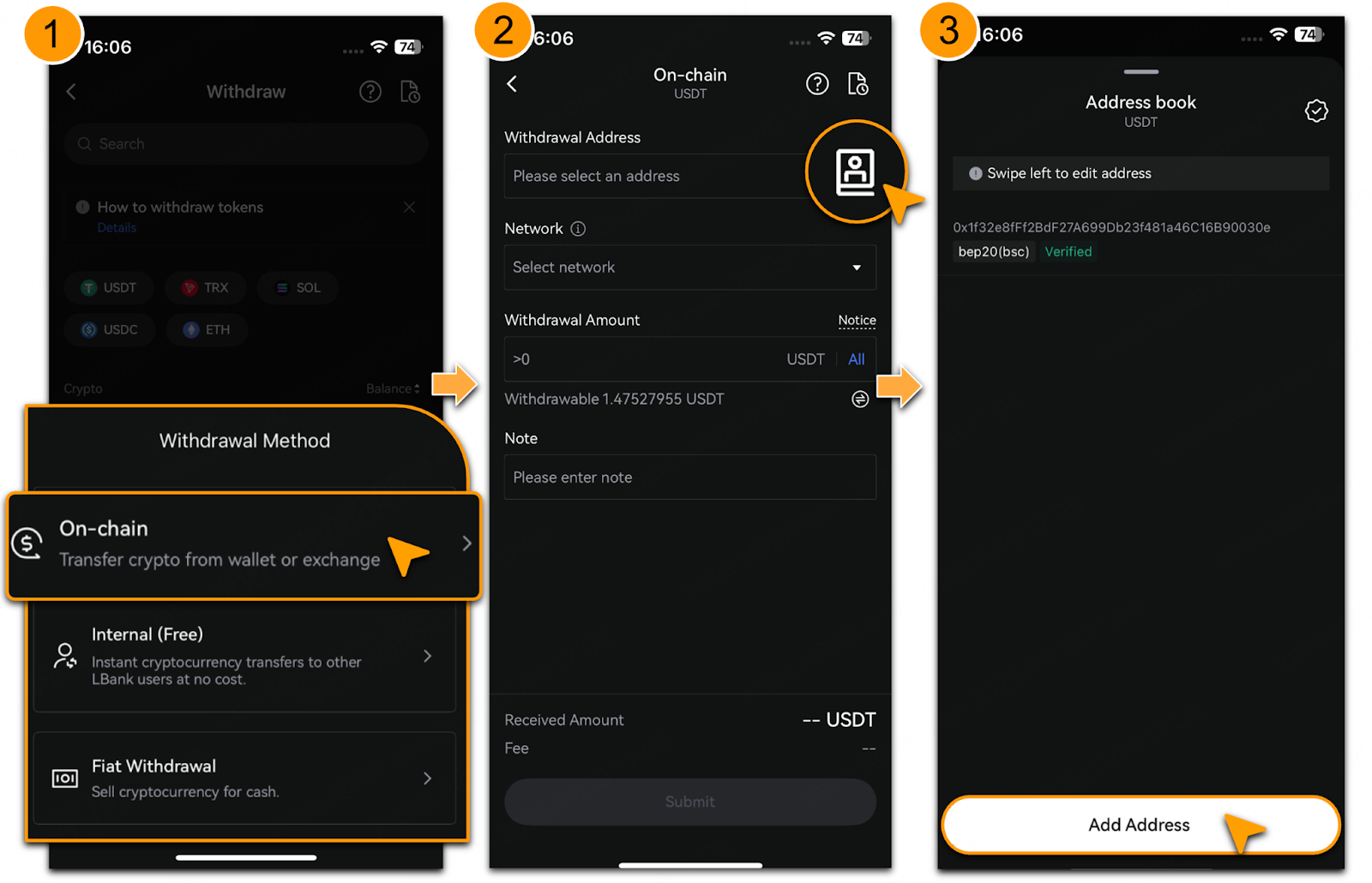
-
Choose「Normal Address」or「General Address」;
-
For「Normal Address」:
-
Choose「Network」;
-
Enter「Address」and「Note」;

-
Tap「Continue adding addresses」to add multiple addresses;
-
Tap「Save」and enter email and Google Authenticator codes, tap「Comfirm」.

-
For「General Address」:
-
Choose「Network」;
-
Enter「Address」and「Note」;

-
Tap「Continue adding addresses」to add multiple addresses;
-
Tap「Save」and enter email and Google Authenticator codes, tap「Comfirm」.

Internal
-
Choose「Internal」;
-
Tap「Address book」>「Add Address」;

-
Choose and enter「UID」,「Phone Number」or「Email」;
-
Tap「Continue adding addresses」to add multiple addresses;
-
Tap「Save」.

Whitelist Addresses
-
In「Add withdrawal address」, tick「Save as verified address to skip future verification」;
-
Enter email and Google Authenticator codes and tap「Confirm」to whitelist the address;
-
Swipe left on「Address」and tap「Delete」to remove from whitelist.

Security Settings
-
In「Address book」page, tap the icon;
-
Tap「Address Whitelist Mode」button. Once enabled, withdrawals can only be made to addresses listed in the address book.

-
Choose whether to enable the「New Address Withdrawal Lock」:
-
Tap「Not now」to enable only the「Address Whitelist Mode」.
-
Tap「Open」to lock withdrawals from newly added addresses for 24 hours.

Notes
Effectively managing deposit and withdrawal addresses helps protect funds:
-
Withdrawal Whitelist: Only addresses in your address book can be used for withdrawals. Add frequently used addresses and enable「New Address Lock」to prevent withdrawals for 24 hours from new addresses.
-
Review Addresses: Check and update withdrawal addresses to ensure they are valid and secure.
-
Enhance Security: Regularly update your password, enable 2FA and Passkey security settings to protect your account.