BitTorrent [OLD] (BTTOLD)

Buy BitTorrent [OLD] (BTTOLD) in Canada

Learn how to buy BitTorrent [OLD] (BTTOLD) on LBank, including payment methods such as credit cards, debit cards, Apple Pay, and bank transfers, as well as the purchase process, preparations, and FAQs.

Step 1
Download the LBank App
Please download the LBank App and register to get started
Step 2
Fund your account
Deposit using your preferred payment method.
Step 3
Choose your cryptocurrency
Select the crypto you want to buy from over 3,000,000 cryptocurrencies available on LBank Exchange or Wallet.

Purchase Decision Overview

Credit / Debit Card

Credit / Debit Card

Fee
Variable Fees
Processing Time
Usually within 1 minute, up to 48 hours
Minimum Purchase Amount
Starting from approx. 10–15 USD
Supported Regions
Subject to region, fiat currency, issuing bank, and payment channel support
Bank Transfer / Local Transfer

Bank Transfer / Local Transfer

Fee
Variable Fees
Processing Time
Depends on the payment method; some local channels may be faster
Minimum Purchase Amount
Starting from approx. 1–10 USD
Supported Regions
Subject to local payment channel support

Three Simple Steps to Buy BTTOLD on LBank

Register an LBank account

How to Buy BTTOLD on LBank: Payment Methods Overview

Explore the available payment methods for buying BTTOLD on LBank, including credit card, debit card, bank transfer, Apple Pay, Google Pay, PayPal, and P2P, to quickly choose the most suitable way to buy BTTOLD.

Credit / Debit Card
Credit / Debit Card
Processing Time: Usually within 1 minute; up to 48 hours
Use a Visa/Mastercard that supports international online transactions and ensure 3D Secure is enabled; if it fails, try a different card or try again later
Common Reasons for Failure: The issuing bank declined the cryptocurrency transaction; insufficient balance; 3D Secure verification failed; risk control interception; or region/card network not supported
Bank Transfer / Local Transfer
Processing Time: Instant or 1–3 Business Days
Verify the receiving account, reference code, and transfer network, and use a bank account consistent with your identity verification
Common Reasons for Failure: Incorrect receiving information or reference code; name mismatch; bank processing delay; or unsupported transfer network

What Do You Need to Prepare Before Buying BitTorrent [OLD] (BTTOLD) on LBank?

Check the preparations required before buying BitTorrent [OLD] (BTTOLD) on LBank, including account registration, identity verification (KYC), payment methods, regional availability, and pre-purchase precautions to help you smoothly complete the BTC purchase process.

Suitable for
Users who want to quickly buy BTTOLD with fiat
Before You Buy: Checklist
Register and log in to your account
Complete required KYC
Prepare payment method
Confirm regional availability,Check limits / fees / processing time
User Path
Buy Crypto

How to Buy BitTorrent [OLD] on LBank – Step-by-Step Guide

Before you begin, decide how you’d like to pay:

Pay with fiat

If you're new to crypto, using fiat currency (such as USD, EUR, etc.) is the easiest way to buy BitTorrent [OLD]. LBank supports various payment methods, including debit cards, credit cards, bank transfers, and other local payment options where available. You may need to fund your LBank account before making a purchase.

Pay with other cryptocurrencies

If you already hold other cryptocurrencies, you can trade them for BitTorrent [OLD] on LBank. Please make sure that LBank supports the trading pair you need (e.g., Bitcoin (BTC)). LBank offers a wide range of trading pairs, allowing you to conveniently convert your existing crypto into BitTorrent [OLD].

LBank supports multiple payment methods

You can use the following payment methods to purchase BitTorrent [OLD] on LBank:

Debit card
Credit / Debit Card
PayPal
Apple Pay
Google Pay

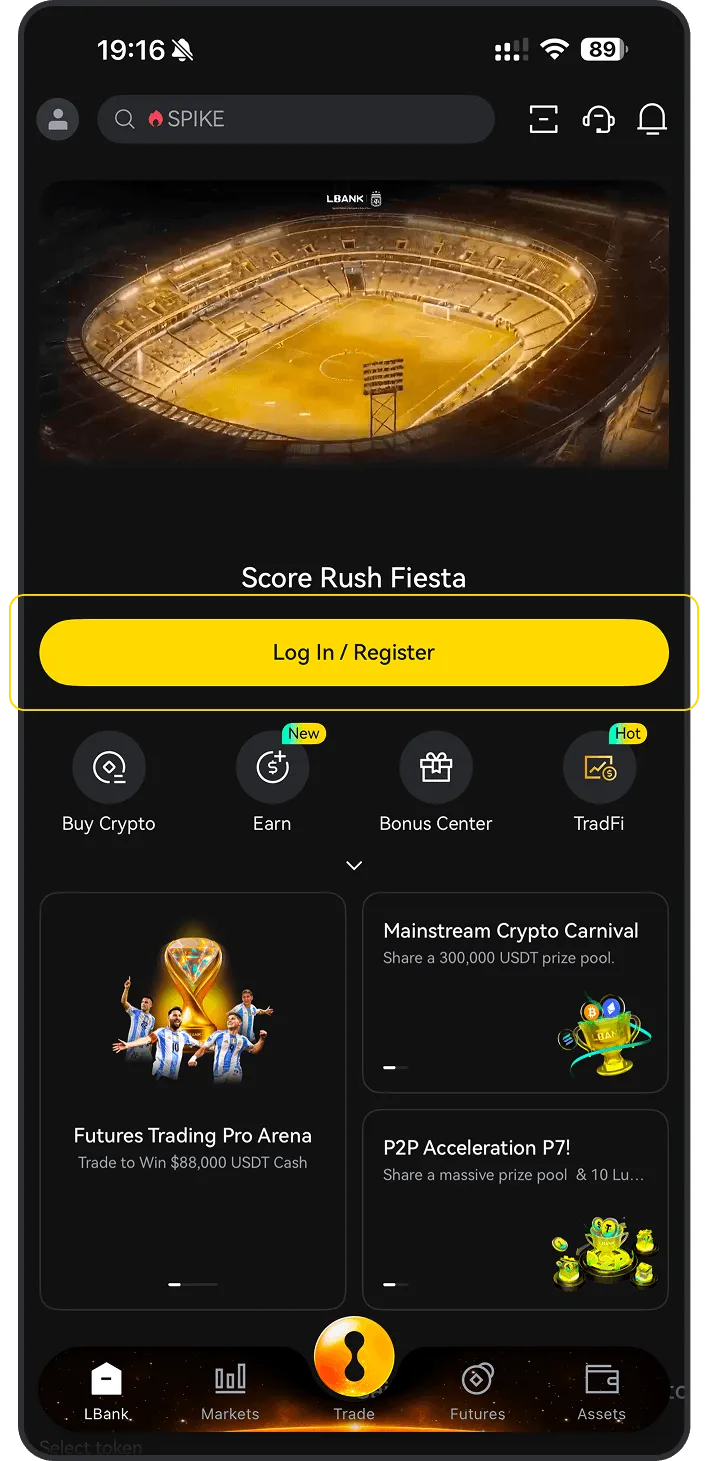
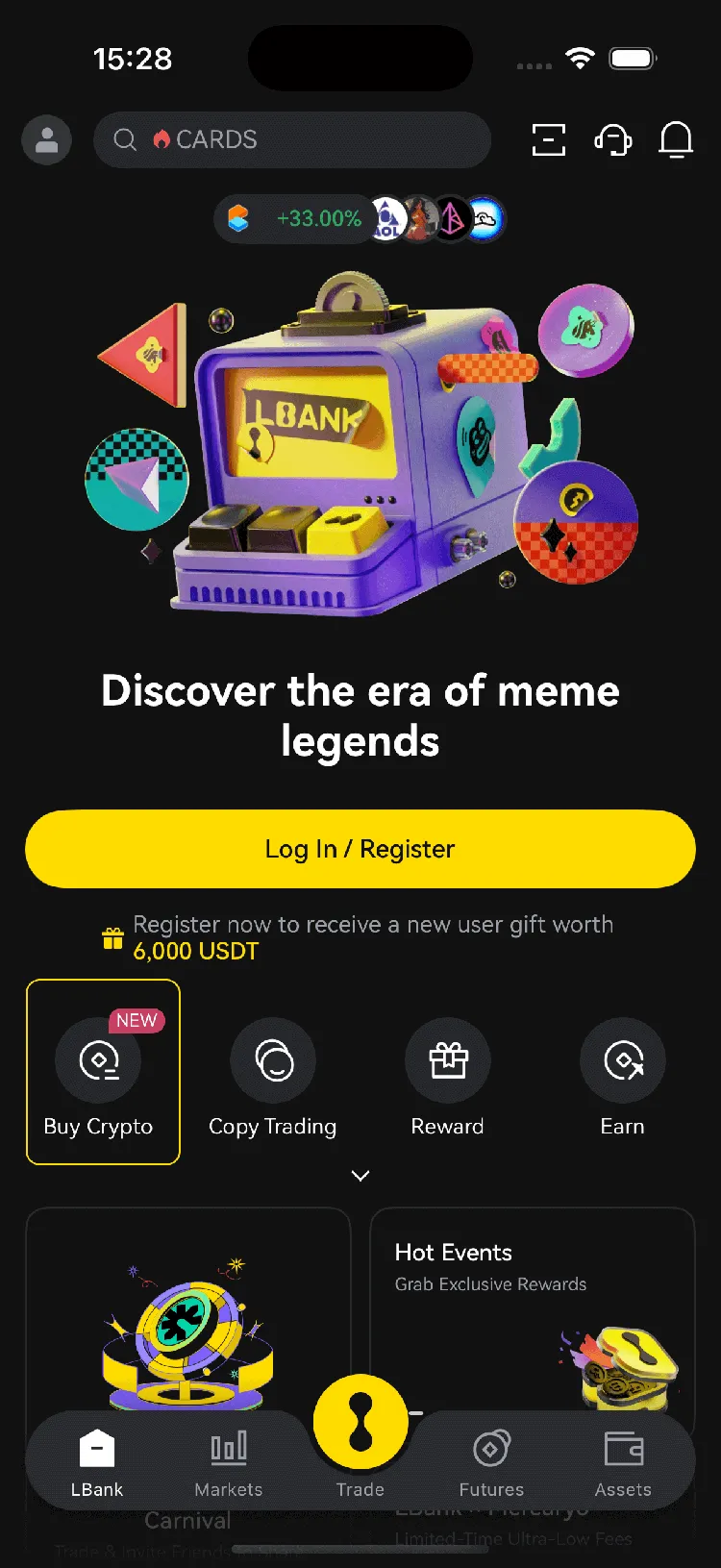
Mobile app guide

1
Open the LBank mobile app and tap “Buy Crypto”
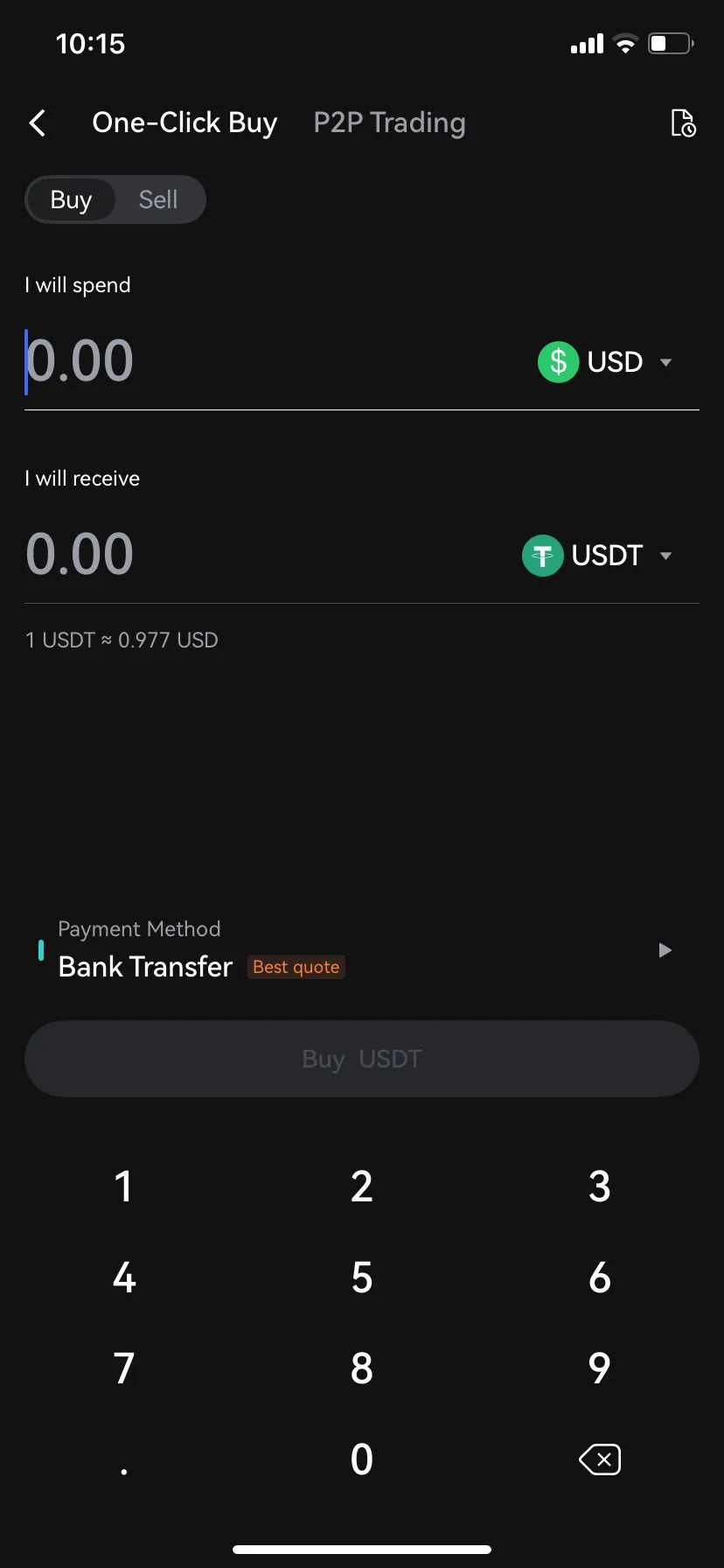
2
Select “Buy”
3
Choose , enter the fiat currency you want to use, input the amount, then tap “Buy” or “Confirm”

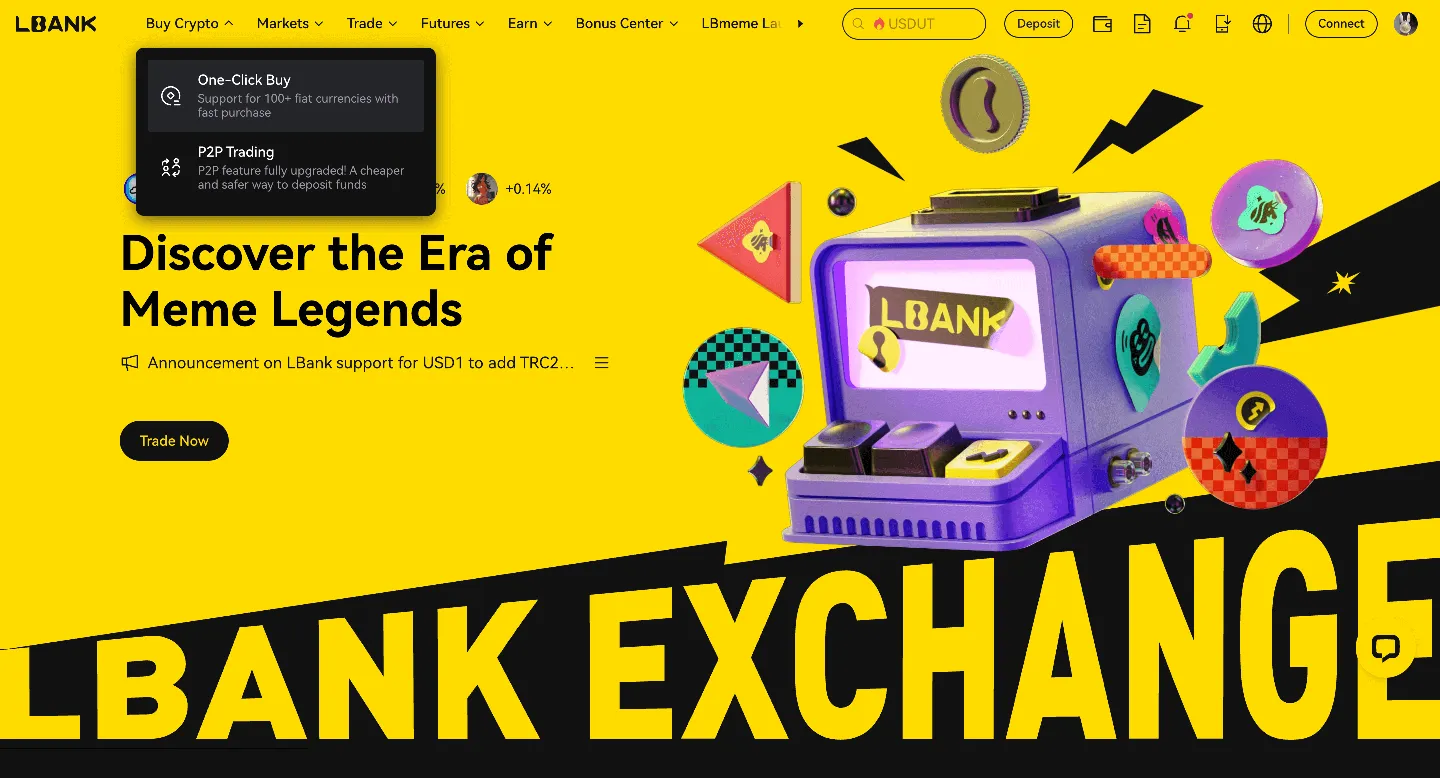
Desktop guide

1
Log in to LBank on your desktop browser and click the “One-Click Buy” option.
2
Under the “One-Click Buy” tab:

(a). Choose the fiat currency you want to use

(b). Select the BitTorrent [OLD] you want to purchase

(c). Enter an amount or use quick-select options (e.g., 100, 200, 500, max)
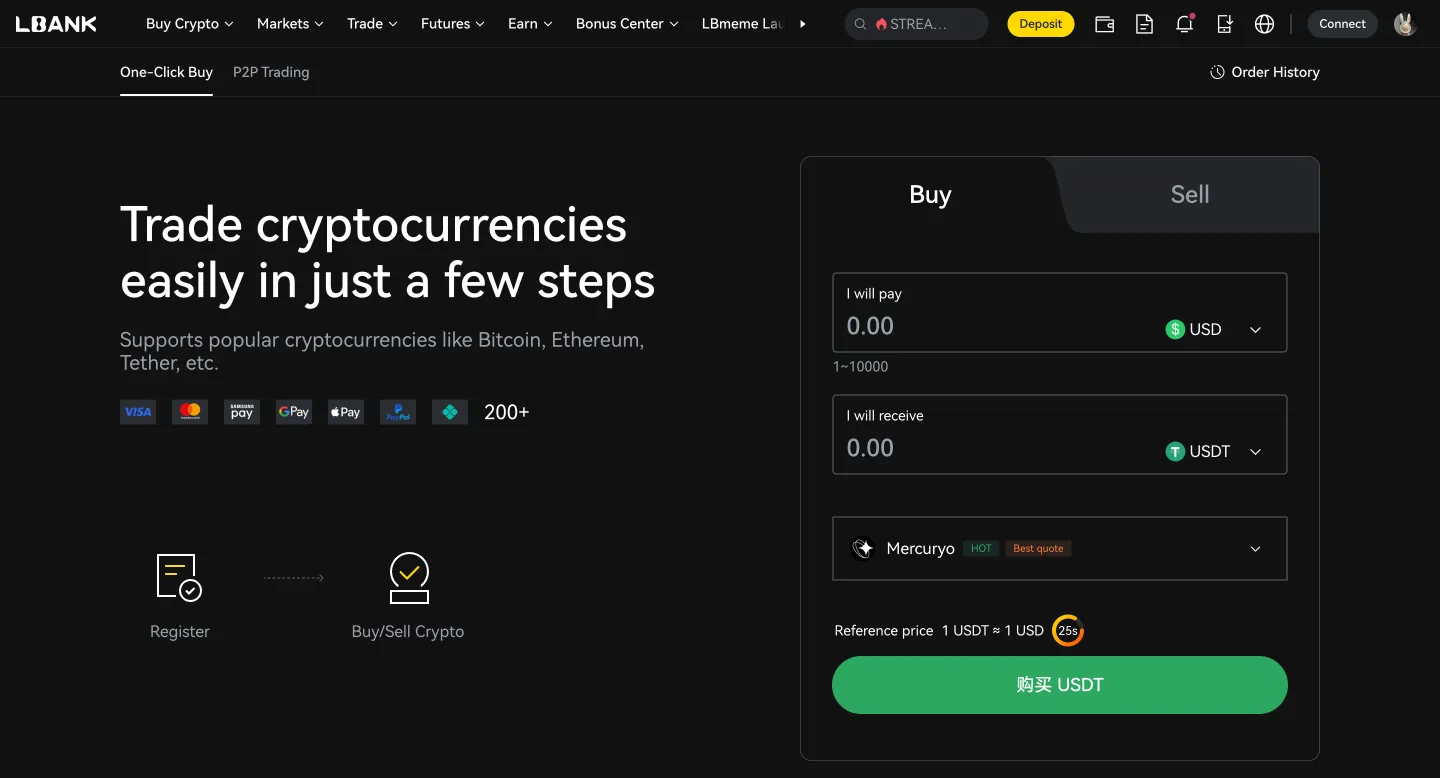
(d). Choose your payment method
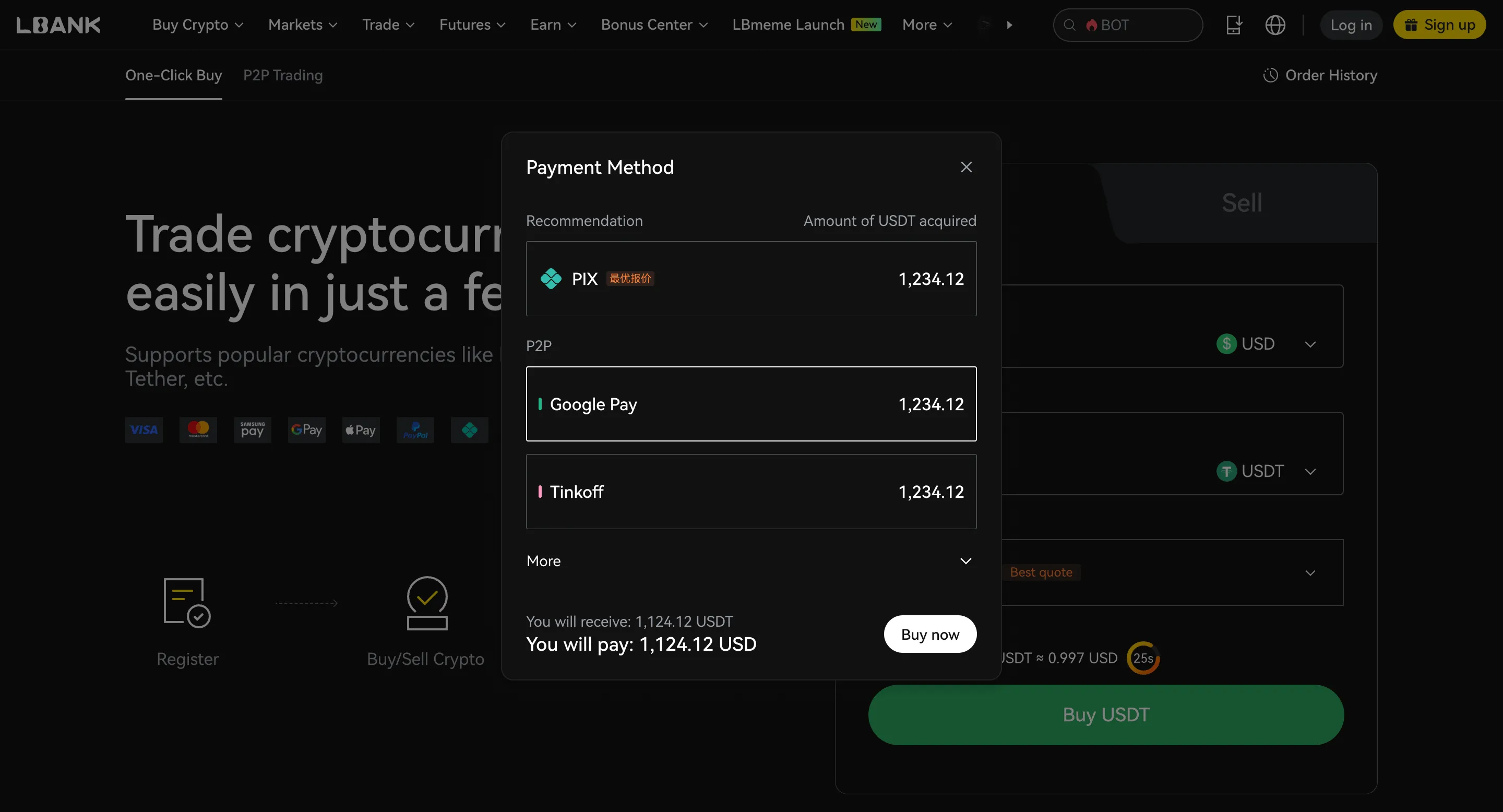
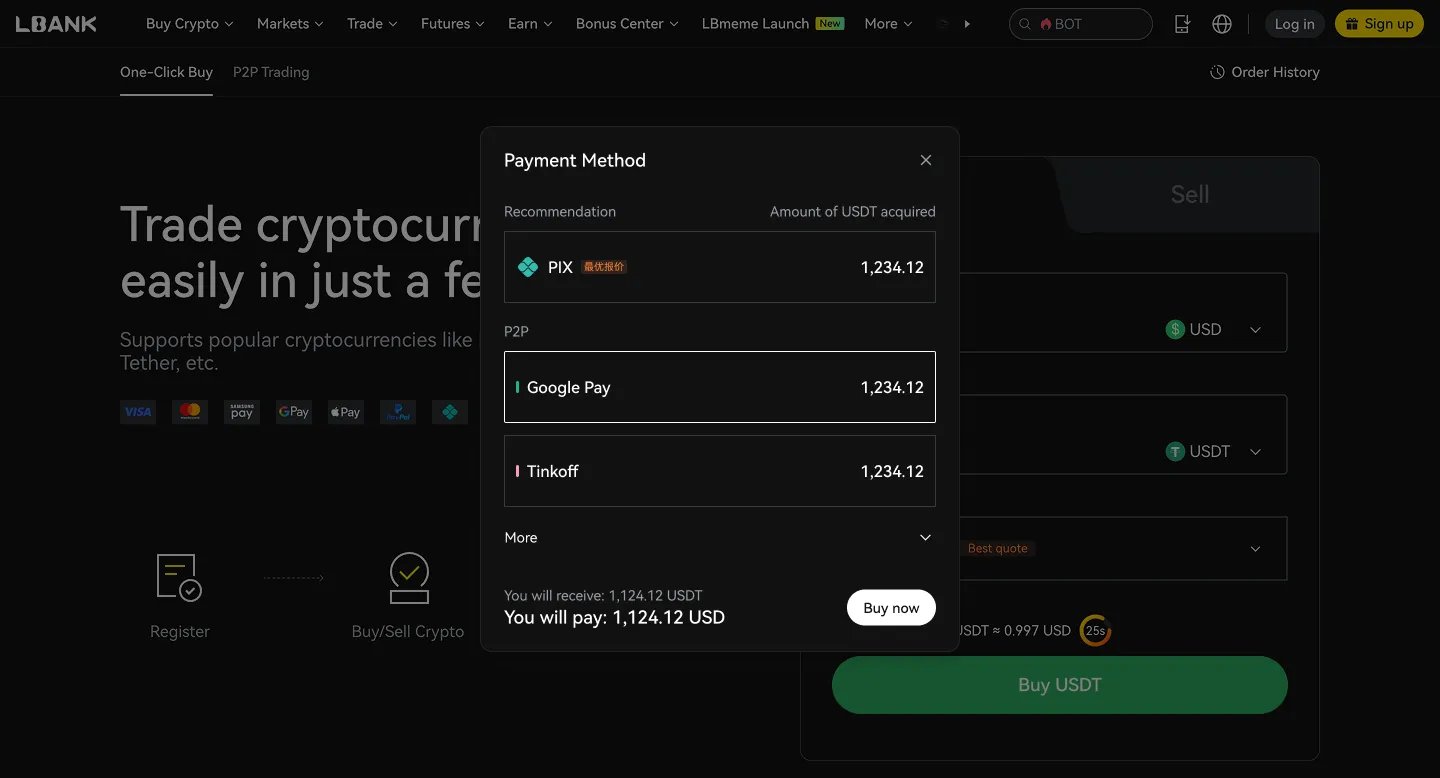
(e). Click “Confirm” or “Buy now”
P2P Trading

Merchant
Price
Amount | Limit
Payment Method
Action
RE
REYZALDI EX
747 min | 100%
0.999 USD
160.00 USDT
20.000 - 150.000USD
Bank Transfer
MY
MYR_ DUITNOW_MYR
868 min | 100%
1.000 USD
1209.99 USDT
100.000 - 1209.990USD
Bank Transfer
MA
MALAYSIAN MYR_KING
575 min | 100%
1.000 USD
1168.25 USDT
10.000 - 1168.250USD
Bank Transfer

What is BitTorrent [OLD] (BTTOLD)?

BitTorrent [OLD] (BTTOLD) is a cryptographic token associated with the BitTorrent ecosystem, a peer-to-peer (P2P) file-sharing protocol. BitTorrent, initially created by Bram Cohen in 2001, allows users to distribute digital files over the internet by sharing the downloading load among multiple computers, which speeds up downloads and reduces hosting costs for large files. The original BitTorrent (BTT) token, now referred to as BTTOLD, was a TRC-10 token built on the TRON blockchain platform. It was introduced to add economic features to the BitTorrent protocol, aiming to incentivize file-sharing by rewarding users with tokens for seeding files longer or providing higher download speeds. The token was meant to create a token-based economy for networking, bandwidth, and storage resources. In 2018, TRON acquired BitTorrent, and under TRON's leadership, the BTT token was launched in February 2019. The introduction of the cryptocurrency was part of TRON's efforts to add more decentralized features to the platform. In 2021, the BitTorrent project underwent a significant change with the launch of the BitTorrent Chain (BTTC) mainnet. This led to a redenomination and migration of the BTT token. The original TRC-10 BTT tokens were renamed BTTOLD, and a new TRC-20 token was introduced, also called BTT or BTTC. The migration involved a conversion ratio of 1:1000 from BTTOLD to the new BTT. During this transition, a significant portion of the original supply of BTTOLD was "burned," meaning tokens were permanently removed from circulation. Many exchanges supported this migration, automatically converting BTTOLD to the new BTTC for users. While BTTOLD represented the earlier version of the BitTorrent token, the newer BTT (BTTC) is now the active token, aiming to expand the functionality and ecosystem of BitTorrent with features like BitTorrent Speed, which allows users to exchange BTT for faster download speeds. BTTOLD can be swapped for the new BTT through specific processes, often involving wallets like TronLink. Learn more

Is BitTorrent [OLD] (BTTOLD) a good investment?

Whether BitTorrent [OLD] (BTTOLD) is a good investment depends on your personal financial situation and risk tolerance. Cryptocurrency investments are speculative and can be highly volatile.


Before investing in BitTorrent [OLD] (BTTOLD) or any cryptocurrency, consider the following:

Your financial goals
Are you seeking short-term gains or long-term growth?
Your risk tolerance
Your risk tolerance
How much potential loss are you comfortable with?
Diversification
Diversification
Don’t put all your eggs in one basket. Spread your investments across different types of assets.
Your goals and time horizon
Cryptocurrencies are best suited for long-term investors. Disclaimer: This is not financial advice. Please do thorough research before making any investment decisions.

Fees, limits, and processing time for buying BTTOLD on LBank

Compare fees, transaction limits, and estimated processing times across different payment methods. Actual fees and availability may vary by region, fiat currency, payment method, and third-party providers. Please refer to the order page for final details.


ROI calculator

If I invest, how much profit will I make?
Invest
$
Enter
BTTOLD
Date
2026-05-28
You will earn $-- in profit, with an ROI of --

What can you do with BitTorrent [OLD] (BTTOLD)?

Investment
Buy and hold BitTorrent [OLD] (BTTOLD), expecting its value to increase over time.
Investment
Trade
Actively trade BitTorrent [OLD] (BTTOLD) on LBank to profit from price fluctuations.
Trade
Pay
Use BitTorrent [OLD] (BTTOLD) to pay for goods and services where accepted.
Pay

Why is LBank the best platform to buy BitTorrent [OLD] (BTTOLD)?

User-friendly interface
LBank offers a simple and intuitive platform for buying and selling BitTorrent [OLD] (BTTOLD).
Competitive fees
Competitive fees
LBank provides competitive trading fees for BitTorrent [OLD] (BTTOLD).
Secure platform
Secure platform
LBank applies robust security measures to protect your funds.
Diverse trading pairs
LBank offers a wide range of trading pairs for BitTorrent [OLD] (BTTOLD).
24/7 customer support
LBank provides customer support to help you with any questions or issues.
Mobile app
Mobile app
Trade BitTorrent [OLD] (BTTOLD) anytime, anywhere using the LBank mobile app.
High liquidity
High liquidity
LBank offers excellent liquidity for BitTorrent [OLD] (BTTOLD) trading, ensuring you can easily buy and sell your crypto assets.
Regulatory compliance
LBank complies with all regulatory requirements in the jurisdictions where it operates to ensure a compliant and secure trading environment

After buying BTTOLD, what is the best way to store it?

After buying BTTOLD, you can choose a storage method based on your usage frequency, holding period, and security needs. If you need to trade at any time, you can store it in your LBank account. If you prioritize self-custody or long-term security, consider using a personal wallet or a hardware wallet.

Store in your LBank account

Store in your LBank account

Suitable for
Users who want to trade or convert at any time
Short-term BTC holders
Features
Ready to use immediately after purchase; easier to use
Ideal for frequent trading, conversions, or using platform features
Security Alert
Please enable 2FA
Please set an anti-phishing code
Only log in through official channels
Transfer to a personal hot wallet

Transfer to a personal hot wallet

Suitable for
Users who want to manage their own assets
Users who need daily transfers or on-chain usage
Features
More flexible; convenient for daily transfers and management
Better suited for small holdings and everyday use
Security Alert
Do not store seed phrases or private keys in the cloud
Do not save sensitive information via chat tools, email, or screenshots
Stay alert for phishing websites and fake wallet apps
Transfer to a hardware wallet

Transfer to a hardware wallet

Suitable for
Long-term BTC holders
High-value holders who prioritize security
Features
Private keys are stored offline, offering enhanced security
Ideal for long-term storage of infrequently moved assets
Security Alert
Securely back up seed phrases offline
Never disclose your recovery phrase to anyone
Assets may be irrecoverable if the seed phrase is lost

BitTorrent [OLD] (BTTOLD) FAQ

BTTOLD refers to the original BitTorrent token, which operated as a TRC10 token on the Tron blockchain. It was active from its launch in 2019 until its replacement in 2021. This initial version of the token was integral to the BitTorrent ecosystem before the major network upgrade.
BTTOLD was upgraded as part of a significant network evolution, specifically with the launch of the BitTorrent Chain (BTTC) mainnet. The primary reason for this replacement was to facilitate the development and support of more extensive and faster decentralized applications. The upgrade aimed to enhance the network's capabilities, capacity, and overall performance to meet future demands.
The successor to BTTOLD is the new BitTorrent token, commonly referred to simply as BTT (or sometimes BTTC on some platforms). This updated token is a TRC20 token, also residing on the Tron network. The TRC20 standard provides enhanced features and a higher capacity compared to the older TRC10 standard, making the new BTT more robust and versatile for the evolving BitTorrent ecosystem and its integration with the BitTorrent Chain.
The redenomination from BTTOLD to the new BTT occurred at a fixed conversion ratio of 1:1000. This means that every 1 unit of BTTOLD was converted into 1000 units of the new BTT token. This process was designed to increase the token supply without altering the total market capitalization or the overall value of an individual's holdings at the time of the swap.
The swap process depends on where your BTTOLD tokens are held. If your tokens are on a crypto exchange that supported the redenomination, the conversion might have happened automatically. For tokens held on other platforms or in a decentralized wallet, users typically need to transfer their BTTOLD to a compatible wallet that supports the Tron network. From there, the swap can usually be performed on the official BitTorrent Chain website. It's important to note that only BTTOLD can be converted to the new BTT, not vice-versa.
Support for BTTOLD has significantly diminished since the upgrade to the new BTT token. Many decentralized wallet providers and crypto exchanges no longer directly support BTTOLD. While users might still be able to access their BTTOLD holdings via their private keys or seed phrases on the Tron network, the primary emphasis for continued engagement with the BitTorrent ecosystem is on utilizing the new BTT token. The project encourages holders to swap their BTTOLD to the updated token for full functionality and support.

How to buy other crypto assets